Social engineering is a sophisticated technique that malicious actors use to manipulate individuals into revealing sensitive information, such as passwords or bank details, which they then use for fraudulent activities. Recognizing the red flags associated with social engineering is crucial for protecting personal and organizational data.
Phishing emails are one of tricky tools used in social engineering. They look pretty real, pretending to be from a company you trust, but they’re frauds. Misspellings or bad grammar can be a good hint that you’re dealing with a scam. And always check the email address – if it’s off even just a bit, be wary. Attachments or links you didn’t expect can also be a sign of a scam, so think twice before clicking on them. Read on to find out more about the different red flags to look out for.
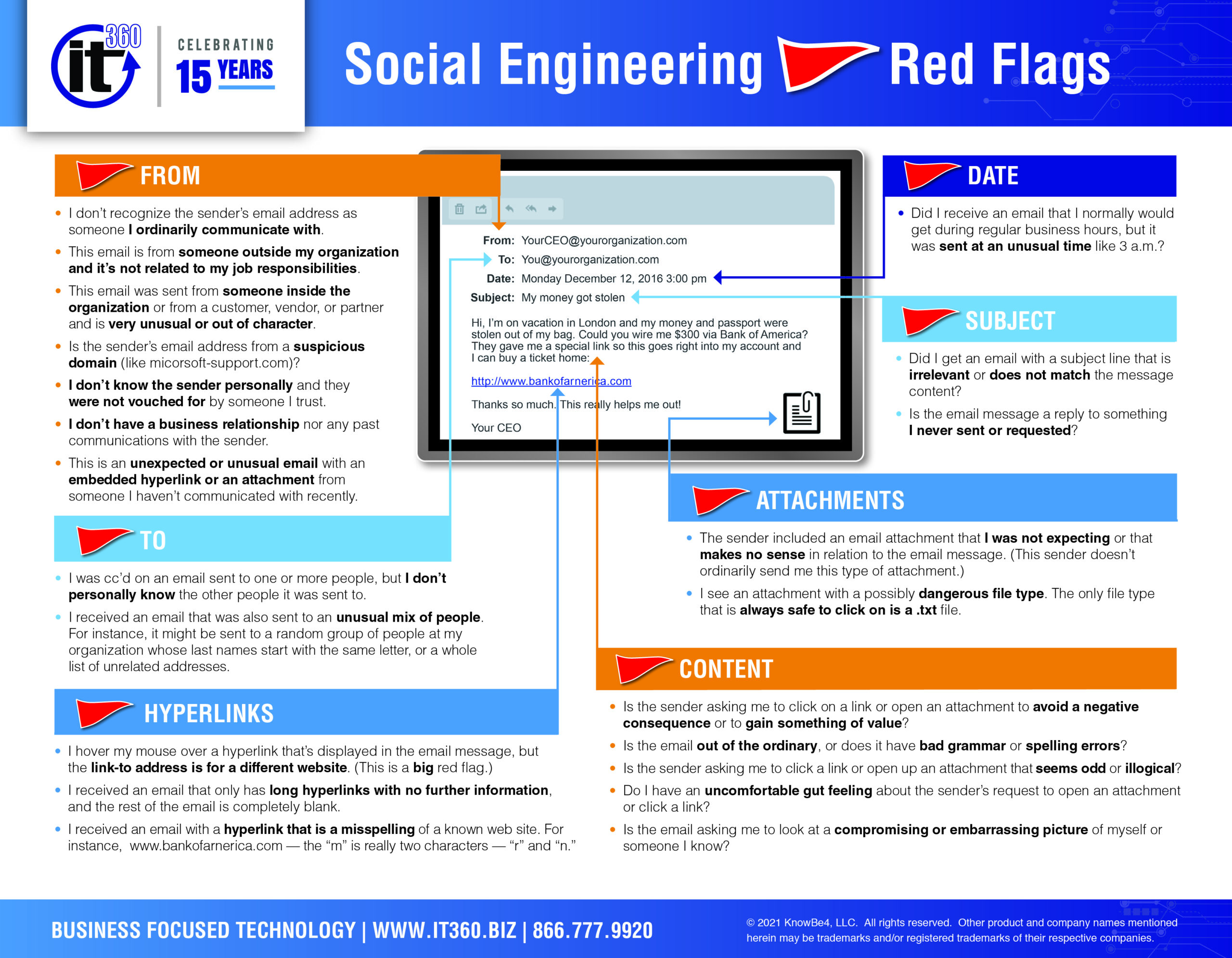
who is the email from?
- I don’t recognize the sender’s email address as someone I ordinarily communicate with.
- This email is from someone outside my organization and it’s not related to my job responsibilities
- This email was sent from someone inside the organization or from a customer, vendor, or partner and is very unusual or out of character.
- Is the sender’s email address from a suspicious domain (like micorsoft-support.com)?
- I don’t know the sender personally and they were not vouched for by someone I trust.
- I don’t have a business relationship nor any past communications with the sender.
- This is an unexpected or unusual email with an embedded hyperlink or an attachment from someone I haven’t communicated with recently.
Who is the email to?
- I was CC’d on an email sent to one or more people, but I don’t personally know the other people it was sent to.
- I received an email that was also sent to an unusual mix of people. For instance, it might be sent to a random group of people at my organization whose last names start with the same letter, or a whole list of unrelated addresses.
What is the date & time?
- Did I receive an email that I normally would get during regular business hours, but it was sent at an unusual time like 3am?
Subject relevance
- Did I get an email with a subject line that is irrelevant or does not match the message content?
- Is the email message a reply to something I never sent or requested?
Check the Attachments
- The sender included an email attachment that I was not expecting or that makes no sense in relation to the email message. (This sender doesn’t ordinarily send me this type of attachment.)
- I see an attachment with a possibly dangerous file type. The only file type that is always safe to click on is a .txt file.
Check the Hyperlinks
- I hover my mouse over a hyperlink that’s displayed in the email message, but the link-to address is for a different website. (This is a big red flag.)
- I received an email that only has long hyperlinks with no further information, and the rest of the email is completely blank.
- I received an email with a hyperlink that is a misspelling of a known web site. For instance, www.bankofarnerica.com — the “m” is really two characters — “r” and “n”.
What is the content of the email?
- Is the sender asking me to click on a link or open an attachment to avoid a negative consequence or to gain something of value?
- Is the email out of the ordinary, or does it have bad grammar or spelling errors?
- Is the sender asking me to click a link or open an attachment that seems odd or illogical?
- Do I have an uncomfortable gut feeling about the sender’s request to open an attachment or click a link?
- Is the email asking me to look at a compromising or embarrassing picture of myself or someone I know?
In wrapping up, being smart with your emails is your best defense against social engineering. Scammers are sneaky, but their tricks often have the same tells. Stuff like high-pressure demands, messages from strangers, typos, or weird attachments can all signal a scam. Stay sharp, trust your gut, and think twice before sharing personal info or clicking on dodgy links. By staying alert and applying these tips, you’ll be way ahead in keeping your data safe from these digital tricksters.